
CHRONO CLASSIC XLS MT - Watch VICTORINOX SWISS ARMY - Free user manual and instructions
Find the device manual for free CHRONO CLASSIC XLS MT VICTORINOX SWISS ARMY in PDF.


User questions about CHRONO CLASSIC XLS MT VICTORINOX SWISS ARMY
0 question about this device. Answer the ones you know or ask your own.
Ask a new question about this device
Download the instructions for your Watch in PDF format for free! Find your manual CHRONO CLASSIC XLS MT - VICTORINOX SWISS ARMY and take your electronic device back in hand. On this page are published all the documents necessary for the use of your device. CHRONO CLASSIC XLS MT by VICTORINOX SWISS ARMY.
USER MANUAL CHRONO CLASSIC XLS MT VICTORINOX SWISS ARMY
CHRONO CLASSIC XLS MT INSTRUCTIONS

English 2-17
Français 18-35
Español 36-52

English
VICTORINOX SWISS ARMY INSTRUCTIONS FOR USE
I. GENERAL INFORMATION
| Disposal of used batteries | 3 |
| Water resistance | 4 |
| Meter/bar correlation | 5 |
II. GETTING STARTED
| 1. Using the crown | 5-7 |
| 2. Display function | 8 |
| 3. Selecting the functions | 8-9 |
III. INSTRUCTIONS FOR USE
| 1. Synchronizing the analog display with the digital display | 9-10 |
| 2. Checking and changing the time display mode | 10 |
| 3. Setting the time | 11-12 |
| 4. Setting the date and month | 12 |
| 5. Correction of the day | 13 |
| 6. Using the timer | 13-14 |
| 7. Display the time of another time zone | 14-15 |
| 8. Using the chronograph | 15-17 |
| 9. Using the alarm | 17 |
English

I. GENERAL INFORMATION
Congratulations on having chosen a Victorinox Swiss Army timepiece. To ensure your timepiece operates perfectly, we recommend that you follow these instructions.
Your timepiece is fitted with either a screw-down or a "pull-out" crown. In order to establish which, gently try to pull the crown out to position 2, if that works, your timepiece is fitted with a "pull-out" crown. If not, use your thumb and forefinger to apply mild pressure on the crown, while rotating towards you to release it. If it does so, you have a screw-down crown
After use, push the crown back in or screw it down until it is secure in order to maintain the water resistance of your timepiece.
Quartz timepieces are battery-operated. When the battery is exhausted, we recommend that you have it replaced immediately at an authorized Victorinox Swiss Army Service Center where the water resistance of your timepiece will also be checked. The battery is not covered by the warranty.
COLLECTION AND DISPOSAL OF QUARTZ TIMEPIECE BATTERIES\*
This symbol indicates that this product must not be thrown away with household rubbish. It must be disposed of at an authorized battery disposal point. By doing so you will be protecting the environment and human health. Recycling conserves natural resources.
*Applicable in EU member countries and countries with similar legislation.

English
WATER RESISTANCE
Please check the details on the back of your Victorinox Swiss Army timepiece case and read the following information carefully:

Water-resistant to 3 atm (100 feet/30 meters). Resistant to rain, splashes and accidental immersion, but must not be worn in the shower or when swimming.

Water-resistant to 5 atm (165 feet/50 meters). May be worn in the shower or when swimming in shallow water. Do not wear when diving.

Water-resistant to 10 atm (330 feet/100 meters). May be worn when swimming or snorkelling.

Water-resistant to 30 atm (990 feet/300 meters). May be worn when swimming, snorkelling or skin diving.

Water-resistant to 50 atm (1650 feet/500 meters). May be worn when swimming, snorkelling or scuba diving.

The water resistance of your timepiece cannot be guaranteed indefinitely, dering that joints may age, crowns or pushers may sustain knocks and climate or erature may vary. We therefore recommend that you have the water resistance of timepiece checked at an authorized Victorinox Swiss Army Service Center every 18 hrs or whenever the timepiece case is opened.
Never operate the crown and/or pushers when the timepiece is under water and ensure that the crown and pushers are properly pushed back or screwed down after each use.
English

METER/BAR CORRELATION
Meter and bar measurements are different things: Under water, the water pressure is added to the air pressure above; a depth of 10 meters corresponds to 1 bar of water pressure and 1 bar of atmospheric pressure above water level, therefore 2 bars in total.
II. GETTING STARTED
1. USING THE CROWN
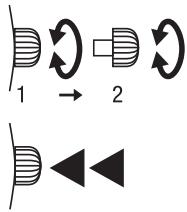
A characteristic feature of your Chrono Classic XLS MT (MultiTask) timepiece equipped with an ETA movement 988.333 is its unique programming crown for all manipulations which you can turn to obtain different functions:
– In neutral position (1):
Selection of the different functions
– In pulled-out position (2):
Correction of the display indication.
The crown also acts as a pusher to activate different functions such as the arming and disarming of the alarm, and to operate the three chronograph functions: starting, stopping and resetting to zero.
text_image
1 → 2 D ◀ ◀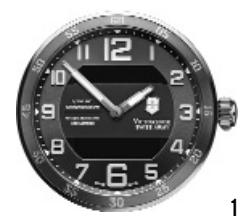
natural_image
Close-up of a black analog clock face showing time, minute, and second hands (no visible text or symbols)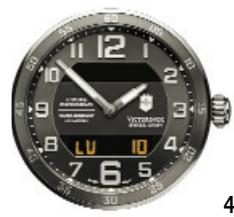
text_image
VETERBOD 12 10 9 8 7 6 5 4 LU 10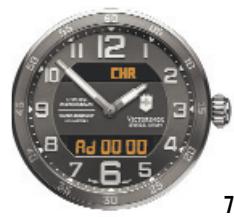
text_image
CHR VICTORIOUS AD 00 00 7 6 5 STU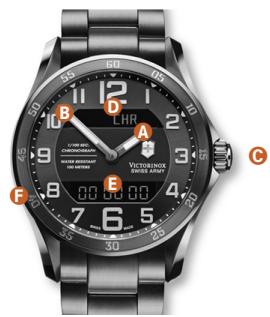
text_image
LHR A VICTOR LONIX 500 WIDE MAX B C D E F 6 7 8 9 10 11 12 13 14 15 16 17 18 19 20 21 22 23 24 25 26 27 28 29 30 31 32 33 34 35 36 37 38 39 40 41 42 43 44 45 46 47 48 49 50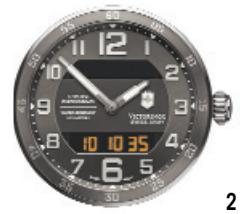
text_image
Vortexwatch SOLDEN 12:00 11:30 10:35 9:30 8:30 7:30 6:30 5:30 4:30 3:30 2:30 1:30 0:30 2 2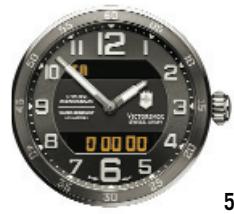
text_image
Close-up of a dark analog clock face showing time, battery, and display with partial text and numbers visible.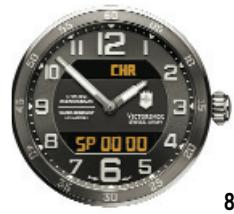
text_image
CHR SP 00 00 8 7 6 5 STO VOCADO SPEED CHRY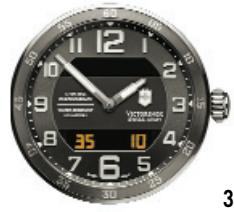
text_image
VICTORADO WALAWA CHAPY 35 10 4 7 6 5 3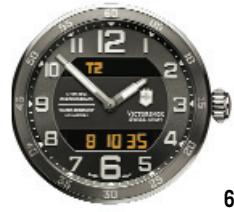
text_image
T2 8 10 35 6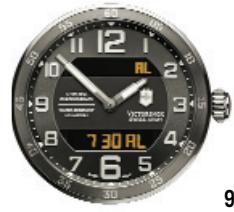
text_image
12 1 10 9 8 7 30 AL 7 6 5 VANTHUSCH WATERMUSCH 9
English
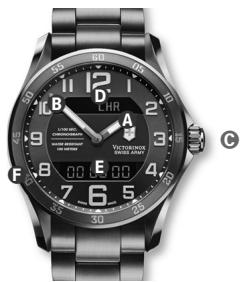
2. DISPLAY FUNCTION
A Hour hand
B Minute hand
© Setting crown
D Indication of the selected function
E Digital display
F Fixed bezel with count-up scale
natural_image
Close-up of a modern wristwatch with black dials and digital display (no readable text or symbols)3. SELECTING THE FUNCTIONS
(refer to figure 1-9)
With the crown in neutral position, turn it clockwise or counter-clockwise. The following information appears on the dial in quick succession depending on the direction of the crown rotation, following a sequential order of 1 to 9 (turn the crown counter-clockwise) or 9 to 1 (turn the crown clockwise).
Please refer to corresponding imagery on the fold-out page.
Fig. 1: Neutral
Fig. 2: Local Time H-M-S
Fig. 3: Seconds/Date
Fig. 4: Day/Date
The selected functions are identified by the alphabet symbol, which appears in the upper section of the dial.
Fig. 5: Timer
TM
Fig. 6: Second Time Zone
T2
Fig. 7: Chrono ADD Mode
CHR
Fig. 8: Chrono SPLIT Mode
CHR
Fig. 9: Alarm
AL
English

Note: The timepiece is equipped with an end-of-life (EOL) battery indication, which operates by causing the digital display to flash.
Countup scale (F)
When a scale is going from 5 to 60 (clockwise incrementation), you may use the bezel as a counter, to count up to 60 minutes. To know how many minutes have elapsed, simply note the number that the minute hand points to.
III. INSTRUCTION FOR USE
1. SYNCHRONIZING THE ANALOG DISPLAY (HANDS) WITH THE DIGITAL DISPLAY (LCD)
After a battery change, or exceptionally in the event of a malfunction, you must always synchronize the time indication by the hands with the time indication by the digital numerals on the dial.
How to synchronize:
– Select the neutral function (Fig. 1) (dial with no digital figures displayed).
- Pull out the crown (C). The symbol R then appears in the upper display (D). The time which appears on the lower display is different from the time shown by the hands.
- Turn the crown in either direction until the hands show the same time as the numerals on the digital display (E):

English
a rapid rotation advances or retracts the hands by one full hour, a slow rotation enables the minutes setting to be corrected.
- Push the crown back down.
– Select the function for local time (Fig. 2).
– Proceed to time setting (3. Setting the time).
2. CHECKING AND CHANGING THE TIME DISPLAY MODE
There are 2 time display modes:
- once 24 hours
- twice 12 hours:
AM from midnight to midday PM from midday to midnight.
– Select function from T2 (Fig. 6).
To check the display mode:
- Push the crown once. If the letter A or P appears time is displayed in the 12-hour mode.
- In the 12-hour mode, a small letter P appears between midday and midnight alongside the numerals displaying the hours.
- Push the crown twice to return to 24-hour mode.
English

3. SETTING THE TIME
Hours and minutes
– Select and display local time (Fig. 2).
- Pull out the crown. The symbol T appears in the upper section (D) of the dial and numerals for hours and minutes flash (E).
- Set the correct time by turning the crown either clockwise or counter-clockwise:
a rapid rotation advances or retracts the hands by one complete hour, a slow rotation enables the minutes setting to be corrected.
- Push the crown back down.
Fine correction of the second
After the time has been set (3. Setting the time), or after a certain period of time in operation, if the timepiece is showing a slight inaccuracy, the time can be set to the exact second.
How to set the exact second:
– Select and display local time (Fig. 2).
- Pull out the crown. The symbol T appears in the upper section of the dial (D) and the numerals for hours and minutes flash (E).
- Push the crown back down. The numerals displaying seconds flash for 1 minute.

English
- While the numerals displayed for seconds are flashing, push the crown to synchronize the time with a time reference. The numerals displayed for seconds are then reset to zero.
Note: Between 0 and 30 seconds, the time will be adjusted to the current minute. Between 31 and 60 seconds, the time will be adjusted to the next minute.
- Check that the minute display (E) is showing exactly the right time. If needed, correct the time by plus/ minus one unit (3. Setting the time).
4. SETTING THE DATE AND MONTH
– Select the function Second-Date (Fig. 3).
- Pull out the crown. The seconds disappear and the numeral for the month appears alongside the date (E). The numerals flash.
– Turn the crown clockwise or counter-clockwise:
a rapid rotation changes the month,
a slow rotation changes the date.
- Push the crown back down. The month display disappears and the seconds display reappears.
Note: Even if the month is not displayed while the timepiece is being used in normal mode, it is still necessary for it to be set otherwise the perpetual calendar will not function correctly (up to 2099).
English

5. CORRECTION OF THE DAY
– Select the function Day-Date (Fig. 4).
- Pull out the crown. A letter appears in the place of the date (E). It indicates the language in which the day is displayed:
E = English, F = French, S = Spanish, D = German.
The language and year flash.
- Turn the crown clockwise or counter-clockwise to obtain the desired language and year:
a rapid rotation changes the language,
a slow rotation changes the year.
- Push the crown back down.
The language and year disappear and the day of the week and the date reappear. If date, month and year are set, the day of the week will be defined automatically (perpetual calendar).
6. USING THE TIMER
Select the Timer (TM) function (Fig. 5):
- Pull out the crown. The numerals displaying hours and minutes start to flash (E).
- Display the desired time by turning the crown clockwise or counter-clockwise (a rapid rotation changes the hours, a slow rotation changes the minutes).

English
- Push the crown back down. The countdown function starts automatically and the timepiece alarm rings when the preset time period has elapsed.
- Push the crown down to stop the alarm.
Note: The countdown function can be cancelled at any time (push in the crown for more than 2 seconds), or a running countdown can be restarted by pushing the crown in once.
7. DISPLAY THE TIME OF ANOTHER TIME ZONE
The timepiece is capable of displaying not only the local time but also the time in a second time zone.
– Select the function Time in a second time zone (T2) (Fig. 6).
- Pull out the crown. The numerals displaying the hours and minutes for the second time zone start to flash (E).
To change these settings:
– Turn the crown clockwise or counter-clockwise.
- Push the crown back down.
Note:
- The display showing seconds cannot be altered (E). This display is the same as the one for local time.
English

- The time zone display is corrected in multiples of 12 hours (E).
- Since the timepiece can operate in either 12 hour (AM-PM) mode, or in 24 hour mode, you must bear this in mind when reading the time shown for a second time zone.
Changing the time zone
Whenever you change time zone or whenever daylight saving changes occur between winter and summer (and vice versa), you are able to advance or retract the time shown by the hands for anywhere between one and several hours without losing the display showing the minutes and seconds. To do this:
- Select and display local time (Fig. 2) and follow the instruction of 3. Setting the time.
Note: In case of daylight saving changes, you will also have to adjust the second time zone accordingly.
8. USING THE CHRONOGRAPH
- Select the Chronograph function CHR (ID) in ADD (Ad) mode – for addition of time (Fig. 7) – or SPLIT (SP) mode – for intermediate times (Fig. 8).
You can only select one of these functions at one time (E), i.e. either ADD or SPLIT, but never both together.
- Starting and stopping the counter with consecutive pushes of the crown.

English
- In SPLIT mode, the split time function enables users to stop the counter to read an intermediate time while continuing timing. When the counter is restarted, the chronograph makes up the elapsed time.
- In ADD mode, you can start and stop the counter. Each time you stop the counter the time is stopped and does not take into consideration the elapsed time.
- To reset the counter to zero, push the crown and hold it down for more than 2 seconds.
- The maximum operational duration is 47 hours, 59 minutes and 59.99 seconds.
- While the chronograph is operating, it is possible to select and use the other timepiece functions at the same time (except for the alternative chronograph mode).
- In order to change the mode (ADD/SPLIT) you have to stop and reset the running chronograph to zero.
- If either of the modes ADD or SPLIT is selected, the display shows the following information:
Timed period < 1 minute:
- SP or Ad mode – seconds – hundredths.
Timed period > 1 min and < 1 hour:
- Minutes – seconds – hundredths alternately with modes SP + or Ad.
English

Timed period > 1 hour and < 48 hours:
- Hours – minutes – seconds alternately with modes SP + hundredths or Ad + hundredths.
9. USING THE ALARM
Test of alarm
Push the crown and hold down for more than 2 seconds after first selecting the Alarm (AL) function (Fig. 9). The alarm will start to sound at this point.
– Select the Alarm (AL) function (Fig. 9).
– Pull out the crown. The numerals start to flash.
- Display the desired time by turning the crown clockwise or counter-clockwise (one rapid rotation changes the hours, and one slow rotation changes the minutes).
- Push the crown back down. The alarm is then set, with AL showing on the display (E).
- To activate / deactivate the alarm, push the crown after first selecting the Alarm (AL) function (Fig. 9).
- AL display = alarm set (armed) (E).
- OF display = alarm not set (disarmed) (E).
- Push the crown down to stop the alarm.
Note: Since the timepiece can operate in either 12 hour (AM-PM) mode, or in 24 hour mode, you must bear this in mind when reading the time shown for a second time zone.

Français
MODE D'EMPLOI VICTORINOX SWISS ARMY
I. INFORMATIONS GÉNÉRALES
natural_image
Close-up of a black analog clock face showing time, minute, and second hands (no visible text or symbols)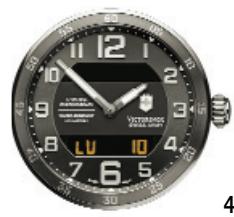
text_image
VETERBOD 12 10 9 8 7 6 5 4 LU 10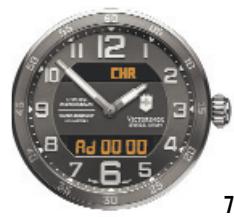
text_image
CHR VICTORIERS Ad 00 00 7 6 5 STU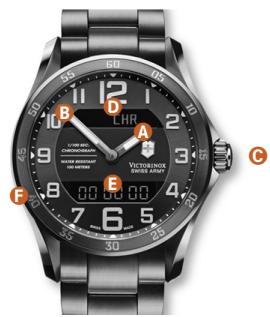
text_image
LHR A VICTOR LONIX 500 WIDE MAX B C D E F 6 7 8 9 10 11 12 13 14 15 16 17 18 19 20 21 22 23 24 25 26 27 28 29 30 31 32 33 34 35 36 37 38 39 40 41 42 43 44 45 46 47 48 49 50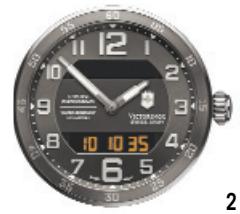
text_image
Vortexwatch SOLDEN 12:00 11:30 10:35 9:30 8:30 7:30 6:30 5:30 4:30 3:30 2:30 1:30 0:30 2 2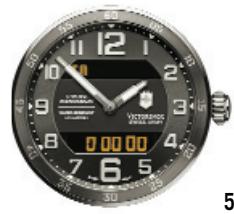
text_image
Close-up of a dark analog clock face showing time, battery, and display with partial text and numbers visible.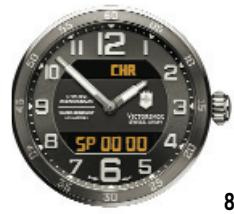
text_image
CHR SP 00 00 8 7 6 5 4 3 2 1 12 11 10 9 8 7 6 5 4 3 2 1 VICTORATOR SHEMICALS STO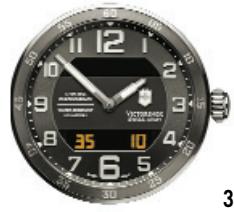
text_image
VICTORADO WALAWARI 2017 35 10 4 7 6 5 3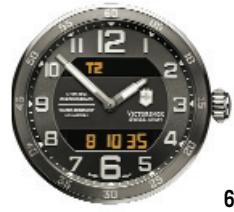
text_image
T2 8 10 35 6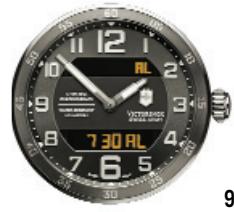
text_image
12 1 10 9 8 7 30 AL 7 6 5 VANTHUSCH WATERMUSCH 9
Français
- En position normale (1):
natural_image
Close-up of a black wristwatch with digital display and wrist strap (no readable text or symbols)3. SÉLECTION DES FONCTIONS
(voir figures 1-9)
natural_image
Close-up of a black analog clock face showing time, minute, and second hands (no visible text or symbols)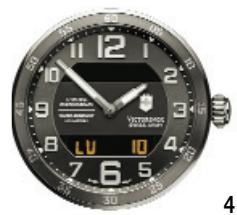
text_image
12 VETERBOS SUNIOR 4 LU 10 7 6 5 SU 3 L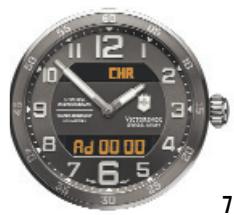
text_image
CHR AD 00:00 7 6 5 VOTRASSO SALADY 7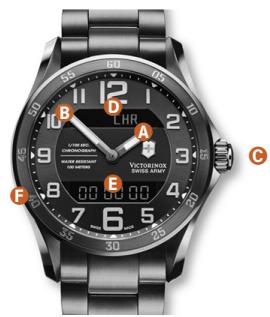
text_image
LHR A B C D E F G H I J K L M N O P Q R S T U V W X Y Z A B C D E F G H I J K L M N O P Q R S T U V W X Y Z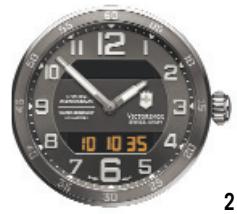
text_image
VICTORIAGE SPECIAL EDITION 10:35 7 6 5 12 9 8 10 4 2 11 12 13 14 15 16 17 18 19 20 21 22 23 24 25 26 27 28 29 30 31 32 33 34 35 36 37 38 39 40 41 42 43 44 45 46 47 48 49 50 51 52 53 54 55 56 57 58 59 60 61 62 63 64 65 66 67 68 69 70 71 72 73 74 75 76 77 78 79 80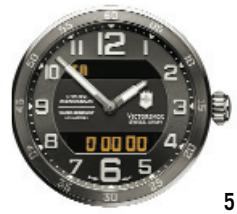
text_image
12 11 10 9 8 7 6 5 4 3 2 1 0 VOTRANSO SWEET & COOK 5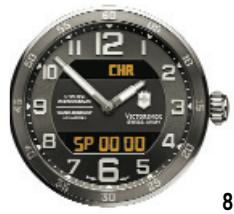
text_image
CHR SP 00 00 VOTRASSO SLA 1.0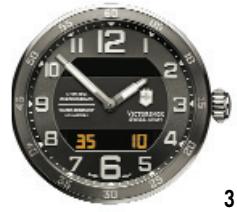
text_image
12 11:00 10:00 9:00 8:00 7:00 6:00 5:00 4:00 3:00 2:00 1:00 VICTORADO SALAD 2017 35 10 4 7 6 5 3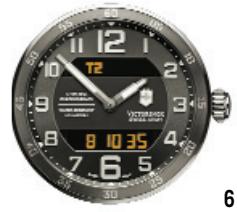
text_image
12 T2 8 10 35 VICTORADO SALADY & COOKING 7 6 5 SU 6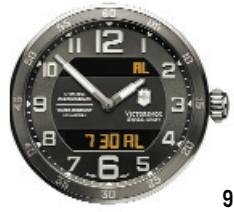
text_image
730 AL VOTRASSO AL
Español
2. INDICACIONES
natural_image
Close-up of a black wristwatch with digital display and wrist strap (no visible text or symbols)Fig. 2: Hora Local H-M-S